
Loading…
How it works
V1 is a business management platform we built for pilots, and the easiest way to explain it is to walk one trip through it. Here's the whole of it, from the day you log it to the packet your CPA asks for in January.
The trip record
Two of them come off the trip on their own. The third is the receipt you photographed and tagged rebill, riding onto the same invoice because you told it to.
Invoice linesGenerated 3 flight days · travel day · per diem ×4 | $5,025.00 |
Logbook draftsGenerated KBED–KTEB 1.1 · KTEB–KBED 1.2 | 2.3 hrs |
Receipts you tag rebillOrganised crew hotel KTEB · airline positioning KBED | $1,098.50 |
| Invoice total | $6,123.50 |
|---|
Illustrative data.
Say you fly Wednesday to Friday for one of your clients and travel out on the Tuesday to get there. You put in the client, the tail number, the legs you flew and how each of those four days counted. Day types are your own list, so if you bill a standby day or a cancellation differently from everyone else, you set that up once and it stays that way.
This is the only time you type any of it. Everything below reads off this one record.
It priced itself off the rate card you set up for that client, so your flight days and your travel day are already on it at the numbers the two of you agreed. Per diem and a cancellation fee go on the same invoice when the trip earned them. You read the lines, change what needs changing, and send it as a numbered PDF.
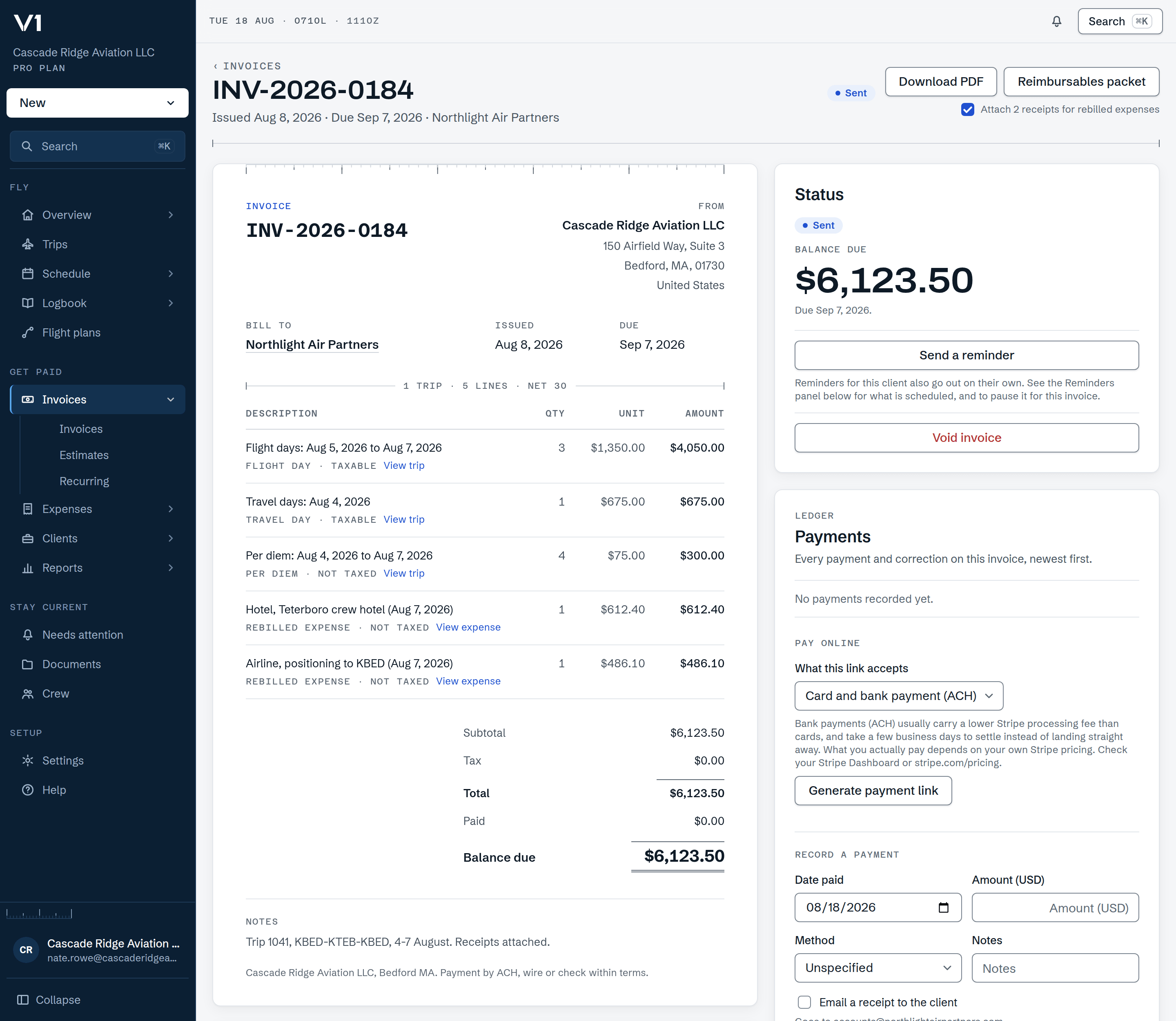
Photograph a receipt at the FBO and mark it rebill or keep. Rebill puts it on that client's invoice as its own line the next time you draft one, and the receipt pages can go out attached to the PDF so nobody has to email you asking for them. Keep leaves it in your own expense records instead.
You decide which one it is. Nothing here invents an expense off a trip, and a receipt already billed on one invoice can't be billed again on another.
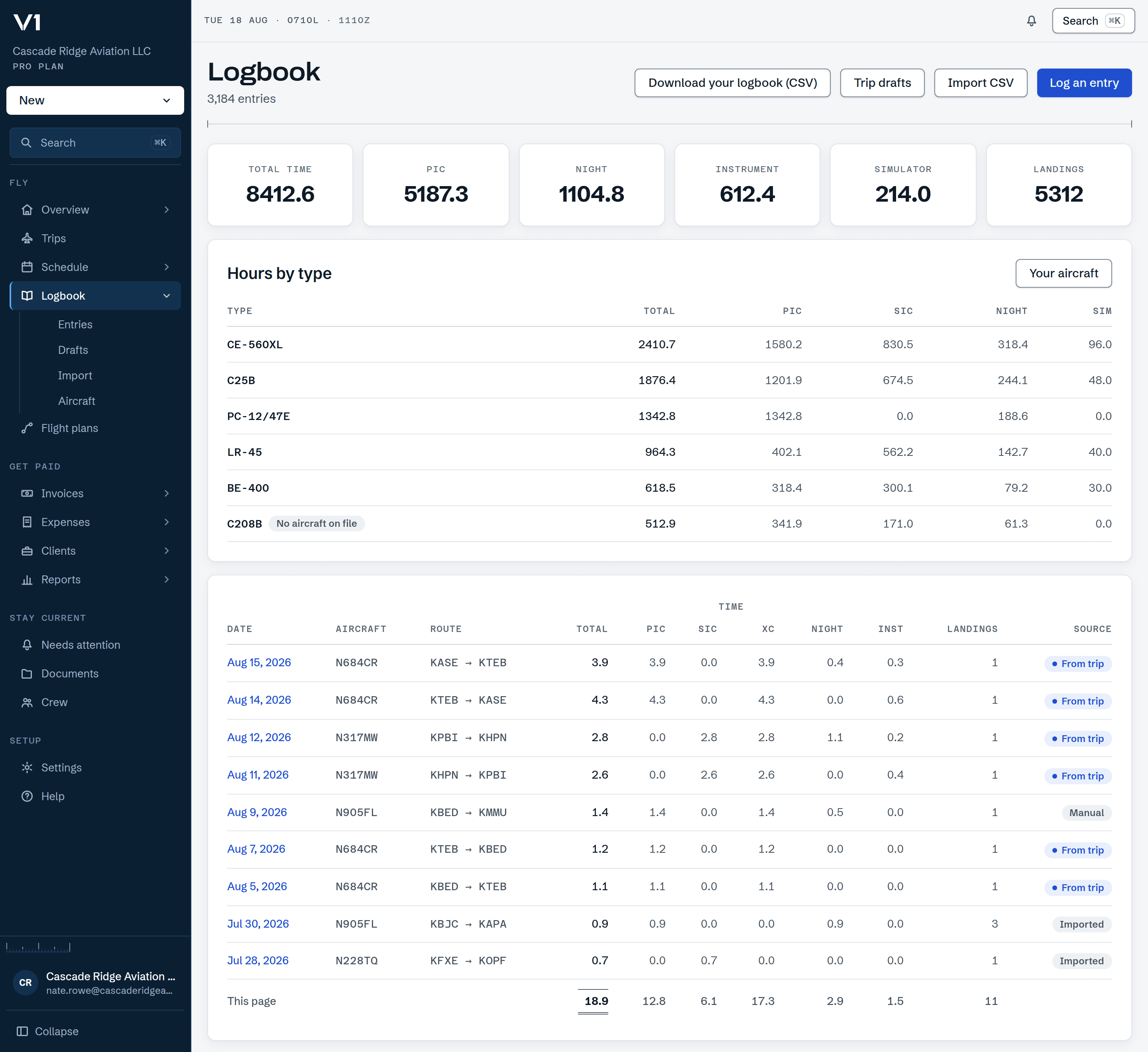
One draft per leg, with PIC and SIC time kept apart, waiting in a queue. You look them over and approve them and they go in. Bring your history with you from a ForeFlight or LogTen export, or any CSV through the column mapper.
Nothing reaches your logbook without you approving it first.
Connect your own Stripe account and the invoice goes out with a card or bank payment link on it. The money settles into your account rather than ours. When it clears, the payment records itself against that invoice and the balance moves on its own, and a bank debit that's still in flight says so rather than going quiet for a week.
Money going back out stays manual. Refunds and disputes you handle in Stripe, then correct the payment here yourself.
Invoice total INV-2026-0184 | $6,123.50 |
Client pays from the link on the invoice | Card or bank |
V1 fee no application fee | $0.00 |
Stripe processing at your own Stripe pricing | Your rate |
That Wednesday-to-Friday trip is already a line in your profit and loss, in your quarterly totals and in the year-end packet your CPA asks for. Your clients and their rate cards, your aircraft, and the dates you keep an eye on all sit in the same account, so your medical and your flight review stop living on a sticky note.
It tracks the dates you entered off your own documents and shows you what's coming due. It does not decide whether you're current or legal to fly, and it never will. That call is yours.
Paid this year | $146,900.00 |
Tagged deduct | $12,865.40 |
Every client you fly for runs a system built to look at their own crew, and that's the right thing for them to have. What none of them can do is look at your whole year across all of them, so that ends up being your job, in a logbook app and a spreadsheet and whatever you use for books.
You're the integration between those three, and you do it by typing the same trip in over and over. V1 takes the other side of that. One record per trip, your clients and their rate cards in one place, and one set of totals at the end of the year that actually covers everybody you flew for.
Plans start at $29 a month and the first month is $5 on monthly plans.